Seven steps to your first win
Get in
Tap Play as guest and the account is created on the spot, no email needed. If you prefer, use Sign in with an email: you type your email and sign in with your password or a 6-digit code sent to the email. As a guest you can save everything later by signing in with a new email.
See what is already yours
Your account starts with the Starter deck of 40 cards, 3 Welcome Packs to open in your first 7 days and 2 free packs already ready. You do not need to build anything for the first duel.
Open the Campaign
In the menu, tap Campaign. All six regions are open from the start: pick any one and tap the first duelist. It is an Apprentice, made for you to learn.
Read the table in 20 seconds
Each side starts with 8,000 Life and 5 cards in hand. There are 5 zones for monsters and 5 for spells and traps on each side. The drawing below shows where everything is.
Play your turn
On your turn you draw up to 5 cards, make one play from your hand (one card or one fusion), attack with your monsters and tap End turn. The player who starts the duel cannot attack on turn 1; the other side can already attack on turn 2.
Make your first fusion
Tap two cards in your hand, in order, then Fuse. The example below uses cards from your Starter deck.
Win and collect
Bring the opponent's Life to zero. You get a grade (S to D), gold according to the grade and, on your first win against each duelist, a random card.
Your first duel is guided
In the first duel of your account, when it is in the Campaign, balloons walk you through your first turn step by step, right when each thing happens: what to tap and what it does. The guide starts by itself, with no button to tap, and on the steps that ask for a tap a little hand 👆 points at the spot. Each balloon moves on when you do what it asks, and Skip guide ends the walkthrough at any time. It only appears in that duel. In it, the rival starts with only 2,000 Life (you have the normal Life), so the win comes in a few turns.
On your first turn of that duel, a Coach's tip card shows the best move before you choose: the two cards of the fusion, the monster they make and its ATK (“Combine A with B → C, 1950 ATK. Stronger than your rival's monster (1550).”), and a little hand taps the cards in order. Use tip only selects the cards for you; you tap Fuse yourself. No, thanks closes the card and you play your own way. Once your monster is in, the attack tip follows, with the battle numbers (what it destroys and how much Life it takes). Tips use only what you can see: your hand, the table and the rival's face-up monsters, never their hand or face-down cards. The last balloon links to the Fusion chapter to study combinations.
The card comes back on your next turns of that duel, until you have played 3 turns of your own (counting the first). At the start of the turn it suggests the best move from your hand (a fusion or a single card); after you play, the attack tip. Use tip and No, thanks work the same way, and if you pick another card the card gets out of the way. When there is no move worth suggesting, it simply does not show up; it only shows on your turn and never holds the turn: End turn stays free. Don't show again, in the corner of the card, turns the tips off for the rest of the duel. If you tapped Skip guide on your first turn, the card does not come back. When the last of those turns ends, a short note says that from now on you are on your own and links to this chapter; Got it closes the note.
In that duel the computer goes first and, with the Starter deck, your opening hand already holds a fusion that beats its first monster: in your first turn you fuse, attack and see the damage. The turn is also longer, 30 minutes, so you can read calmly; if you leave the game, the usual grace period applies (300 seconds).
In every duel, the ? How to play button at the top of the screen shows all the steps again (with Next, Back and Skip), even if you have seen them before. It does not pause the duel: the clock keeps running.
The table, numbered
In every duel, the ⤢ View cards enlarged button, next to your hand (right above End turn), opens every card on the table at a large size: the monsters on both sides with their current ATK and DEF next to the printed ones, their position, constellation and modifiers; the spells and traps (the opponent's face-down ones stay hidden, yours are marked face-down); the field in play; and your hand. It works on your turn and on the opponent's and does not pause the duel: the clock keeps running and is shown at the top. The same button, Esc or a tap outside the cards brings back the normal table.
Both graveyards are public. On each player's name plate, the Graveyard N › chip (the little arrow tells you it can be tapped) opens the list of the cards that went there, newest first, with the art, the name and the ATK/DEF; tap a card to see its details. There is a tab for your graveyard and one for the opponent's. On a computer, a tap on the graveyard pile on the table does the same. It does not pause the duel either; ✕, Esc or a tap outside the cards closes it.
Your face-down cards: tap one of your cards that is face-down (monster, spell or trap) to remember which it is. It opens enlarged with the tag Face-down — only you can see it. Only you have this option: the opponent's face-down cards never even reach your device (the server sends just a “?” in their place, without the constellation), so tapping them never reveals what they are, and the attack preview against a face-down monster counts no constellation until it is revealed.
- 1 Life
- 2 Hand
- 3 Deck
- 4 Graveyard
- 5 Monster zones
- 6 Spell/trap zones
- 7 Field (one for the whole table)
- 8 Clock

The turn in one sentence
You draw up to 5 cards and do, in any order: one play from your hand, your monsters' attacks, position changes and the activation of cards you already set on the table. Then you tap End turn. There are no phases or steps: that is all.
Your first fusion, with cards from your deck
The Starter deck was built so that several of its cards fuse with each other. Here is the nicest example: two common cards become a much stronger monster, and that one can still fuse again.
Fusion 1 · General rule
 Glass-Sand WyrmDragon · FireATK 1,200
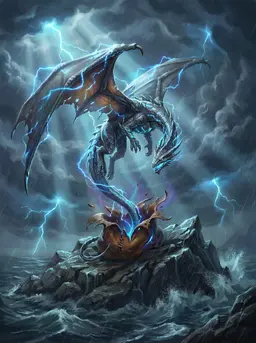 Aeolian Storm DrakonDragon · ThunderATK 1,250
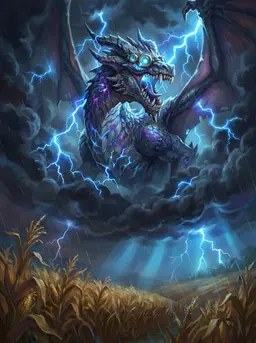 Dragon of Tláloc's StormDragon · ThunderATK 1,800
The stronger of the two has 1,250 ATK. The result needs at least 1,550: the lowest monster of that type and element from there has 1,800.
Fusion 2 · General rule
Dragon of Tláloc's StormDragon · ThunderATK 1,800 Mountain Lightning FalconBird · ThunderATK 1,250
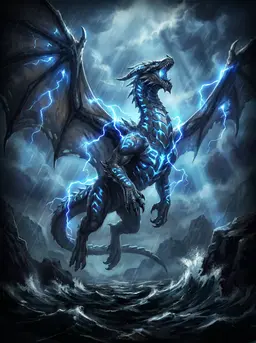 Thunder-Rune DragonDragon · ThunderATK 2,150
The result of fusion 1 enters fusion 2. Now the stronger one has 1,800: the result needs at least 2,100 and the lowest from there has 2,150.
Notice that the order in which you tap the cards matters: the result of the first fusion enters the next one. The chapter Fusion has the full rule; for now it is enough to know that the game picks the right monster for you.


Win and get rewarded
When the duel ends, two grades appear: POW (Power) and TEC (Technique). Rewards use the better of the two. Against the computer, a win pays 20 gold to 120 gold, depending on the grade, up to a daily cap; the first win against each Campaign duelist does not count toward the cap and also gives a card.

Your next ten minutes
- Open your packs (Packs): new cards for free.
- Check the Starter deck and, when you want, build your own (Collection, decks and Codex).
- Look at the daily quests (Quests and Daily gift): they pay gold and pass XP.
- Keep going in the Campaign: every duelist you beat opens the next one.
